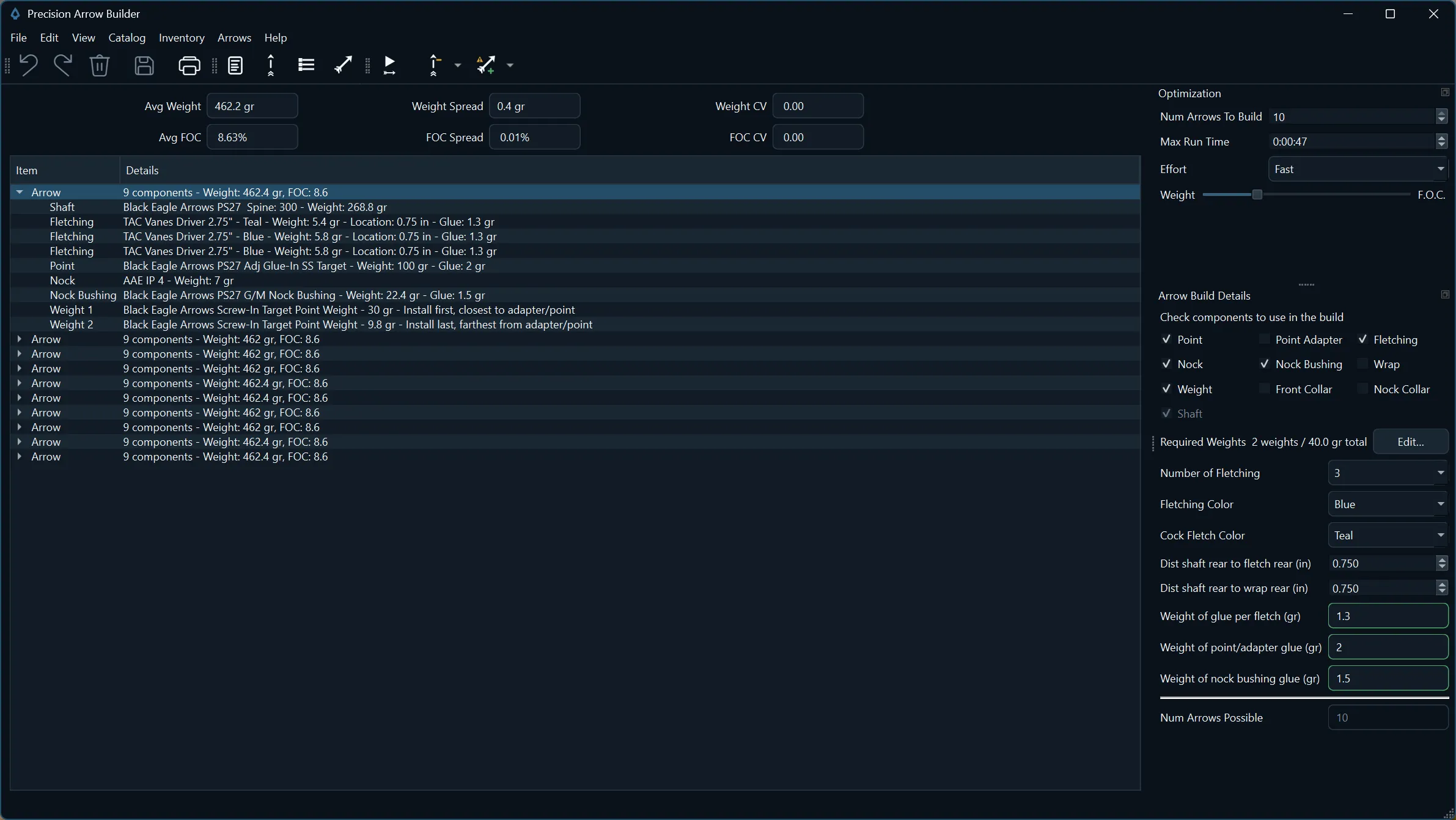
The Results view: a proposed set built from measured inventory, with set-wide weight and FOC figures and each arrow's components.View full size
See Precision Arrow Builder in action
A short walkthrough of the real application, from component data to a finished arrow set. The demo has background music and on-screen captions, with no narration.
The demo shows how to:
Organize component data in your catalog
Record measured weights and quantities in inventory
Build an arrow set from that inventory
Review the results before you assemble
Save the finished set and its arrows (Pro)
How it works
01
Measure
Weigh your components and record each measured weight and quantity in inventory.
02
Optimize
Choose the components for the build. Precision Arrow Builder finds combinations that keep weight and FOC closely matched across the set.
03
Build
Review the proposed set, then assemble each arrow from the components listed for it.
04
Recall and refine
Adjust the build and compare again. With Pro, keep finished sets on record for additions and replacements.
Build more consistent arrow sets
Small differences between components add up across a set. Precision Arrow Builder uses the details you measure to identify combinations intended to reduce weight and front-of-center (FOC) variation from arrow to arrow.
Measured inventory
Build from measured inventory
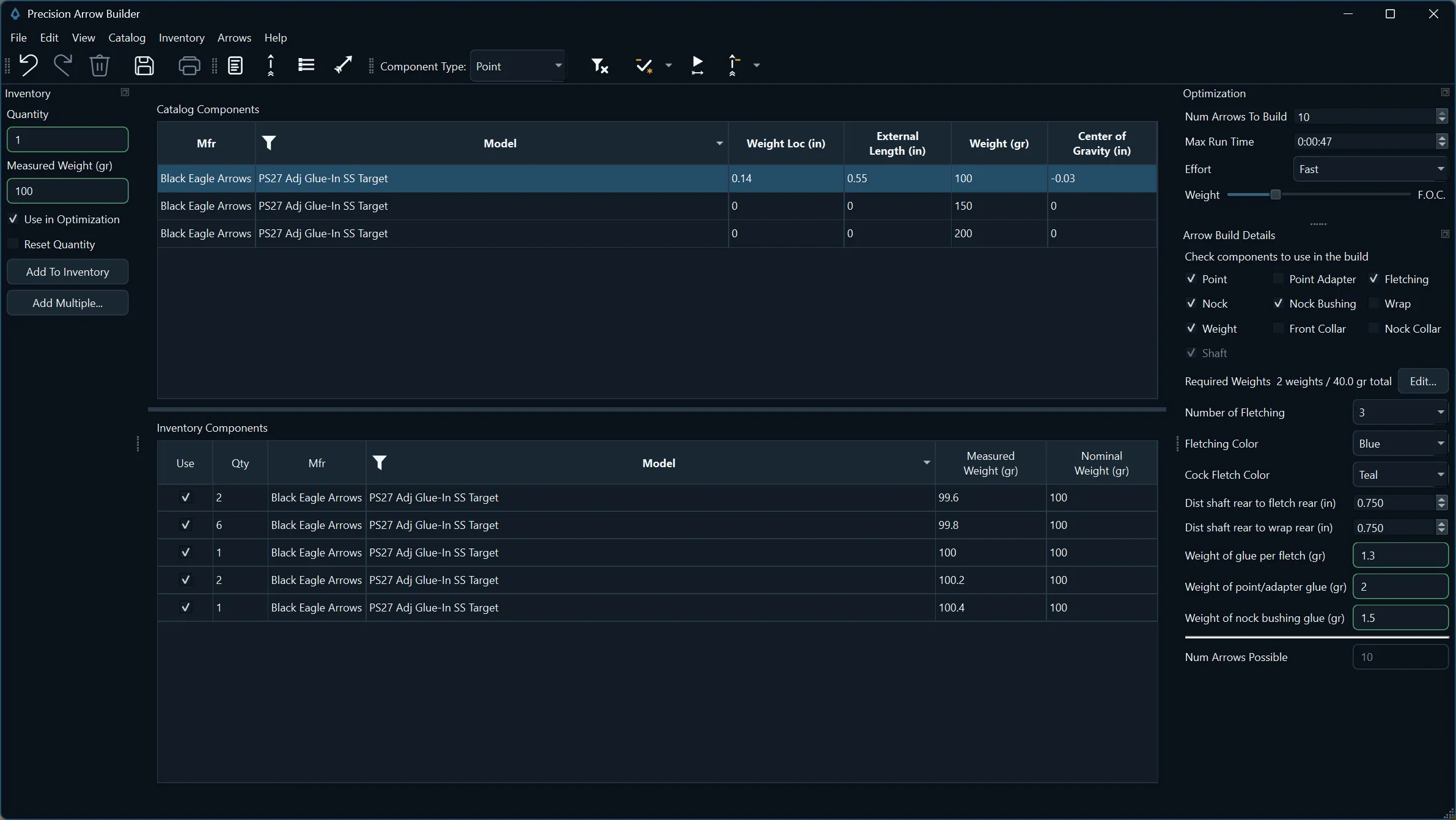
Use the components you actually measured, not only nominal catalog values. Record the weight of individual points, shafts, nocks, and other parts, track how many of each you have, and choose which ones go into the build.
Measured weights sit next to nominal catalog values, so the build starts from what is actually on your bench.View full size
Results
Compare before you build
Review the proposed set before committing components to assembly. The Results view shows average weight and FOC, the spread and variation across the set, and the exact components and glue weights assigned to every arrow.
These figures describe the arrows you plan to assemble. Shooting results still depend on bow setup, tuning, form, and conditions.
Set summary and one arrow's component breakdown from the Results view.View full size
Arrow Inventory Pro
Save what worked
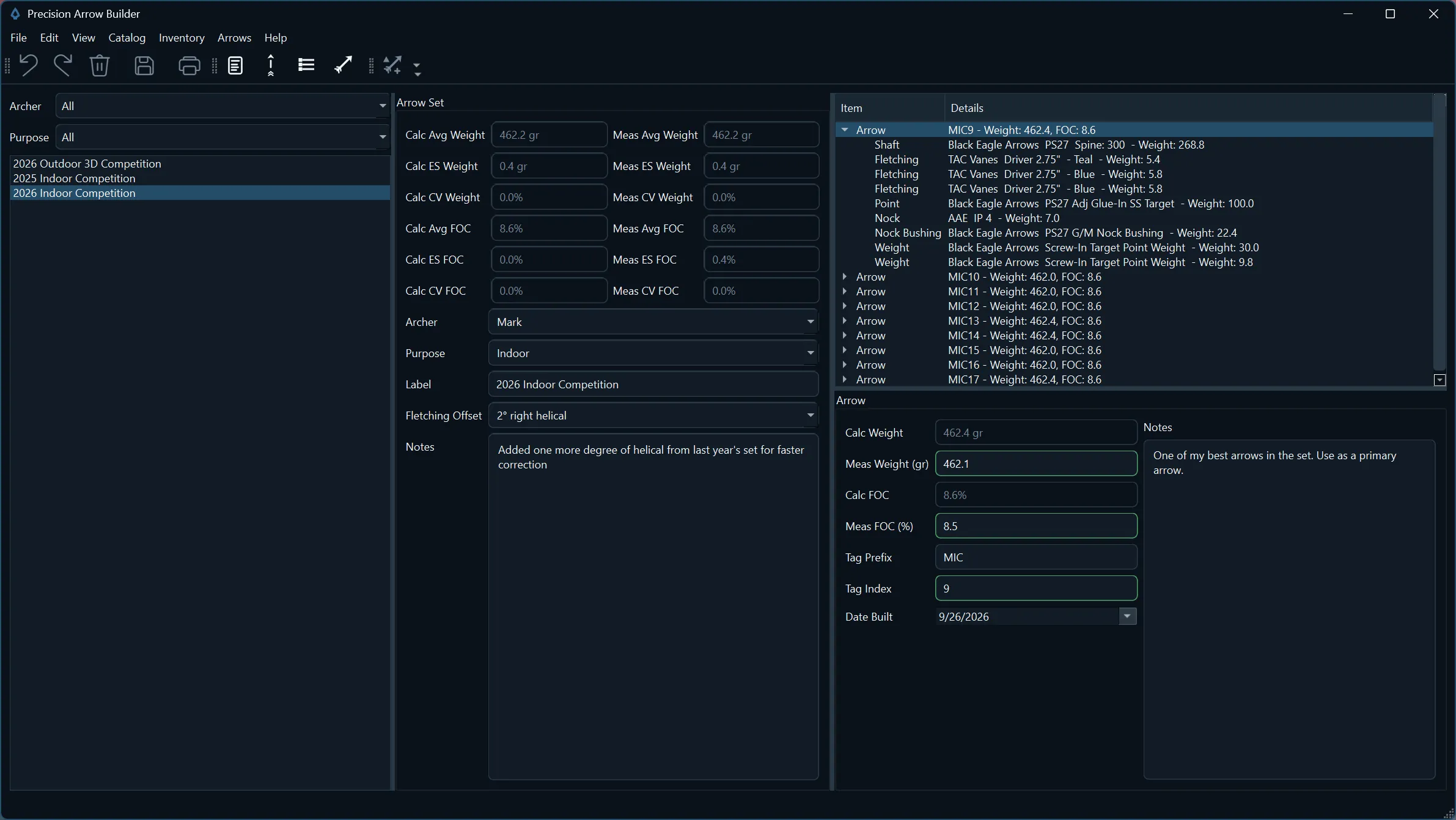
Keep a record of finished arrow sets and the details that went into them. Pro saves each set with its archer, purpose, label, and notes, and keeps individual arrow records with tags, measured weight and FOC, and build dates.
When you need to add or replace arrows, recall the set and build to match.
Arrow Inventory, included with Pro: saved sets filtered by archer and purpose, with calculated and measured details side by side.View full size
Component catalog
Keep your component data organized
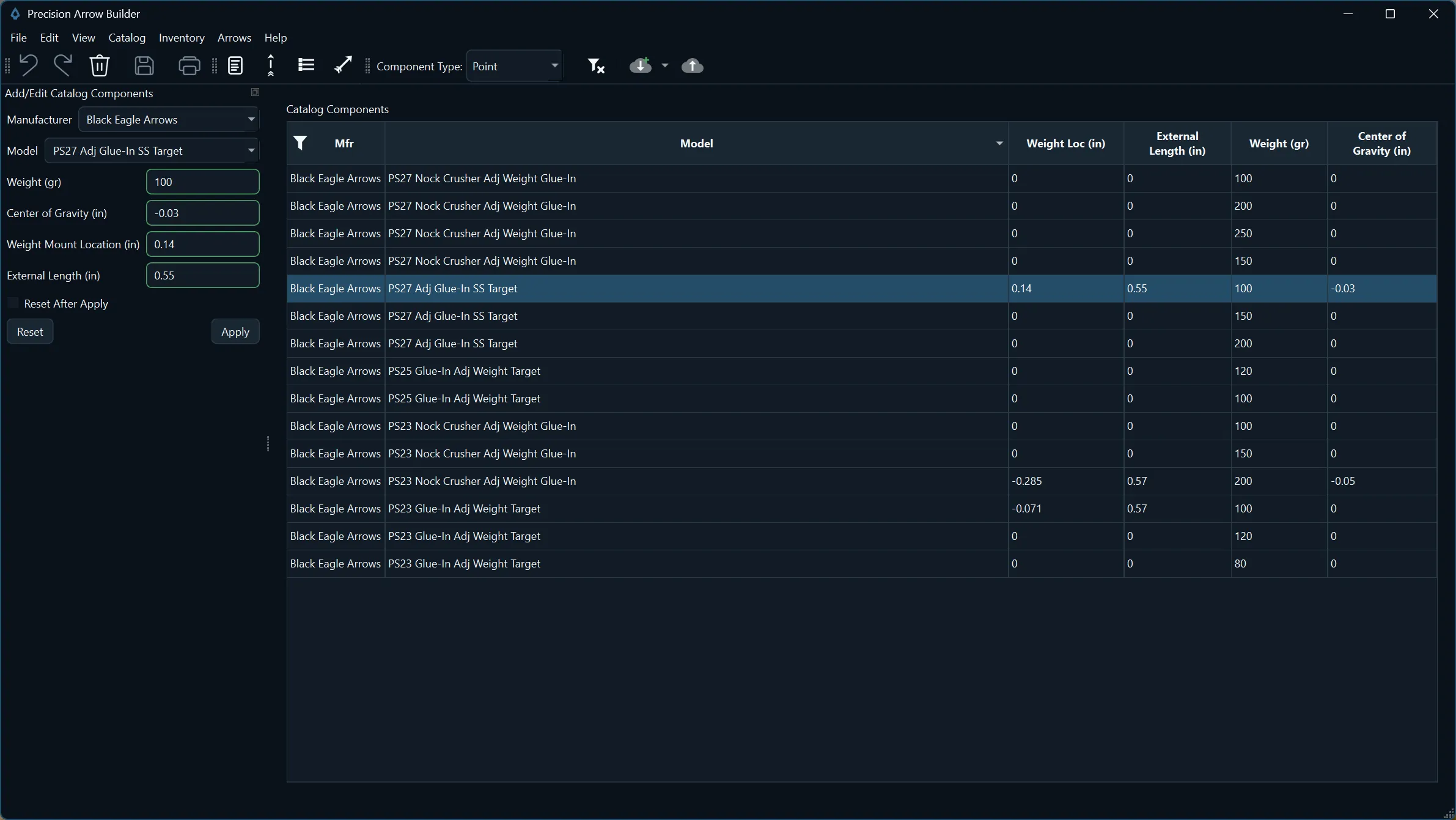
Build a personal catalog of the points, weights, shafts, and other parts you use, with the specifications Precision Arrow Builder needs for weight and FOC calculations.
The component catalog, with an edit panel for adding or updating parts.View full size
Community Catalog Plus and Pro
Import shared, user-submitted component records into your personal catalog to reduce manual data entry, and submit additions or updates of your own.
Community catalog data is user-submitted. Precision Arrow Builder Software, LLC may perform a cursory review for obvious inaccuracies, but cannot independently verify or measure every component.
Free technical tools and references
Free calculators and reference material for archers who measure the details, available without buying or installing anything.
Choose the annual plan that fits your arrow-building workflow. Every active plan includes applicable updates and new versions made available to similarly situated subscribers during the subscription term.
Builder
Core catalog, measured inventory, and Arrow Set Builder capabilities.
Precision Arrow Builder is Windows desktop software. Plans are annual subscriptions, and renewal and billing details are shown at checkout. A successful purchase provides the license needed to activate the software.
One active installation
Activation is required. Unless applicable purchase terms state otherwise, one license permits one activated installation at a time on one authorized device. The app may require periodic online license validation.
Your working data stays local
Normal working data is stored locally on your computer; Precision Arrow Builder does not provide general cloud sync or cloud storage for it. Community Catalog submissions happen only when you initiate them.
Updates, cancellation, and terms
Applicable updates released for similarly situated subscribers are generally included during an active term. Canceling renewal ordinarily does not shorten a paid term. Purchase, refund, and billing terms remain subject to checkout and merchant-of-record terms and our Terms and Privacy Policy.
System requirements
Windows 11, 64-bit
8 GB RAM recommended
Modern 64-bit Intel or AMD processor
1920x1080 recommended
500 MB available disk space
Internet required for activation and online features
Precision Arrow Builder is Windows desktop software that helps archers turn measured component and build details into better, more consistent arrow sets.
Is it a Windows desktop app?
Yes. Precision Arrow Builder is Windows desktop software.
What is the difference between Builder, Plus, and Pro?
Builder includes the core personal catalog, measured inventory, and Arrow Set Builder. Plus adds Community Catalog import, update, and submission tools. Pro adds Arrow Inventory for saved sets and individual arrows.
How does licensing and activation work?
A successful purchase provides a license for one activated installation at a time on one authorized device unless the purchase terms say otherwise. Activation is required, and periodic online validation may be required.
Where is my working data stored?
Normal working data is stored locally on your computer. There is no general cloud-sync or cloud-storage service for normal working data.
How does the community catalog work?
Plus and Pro can import shared, user-submitted component records into their personal catalog and submit additions or updates. Community catalog data is user-submitted. Precision Arrow Builder Software, LLC may perform a cursory review for obvious inaccuracies, but cannot independently verify or measure every component.
What does Pro add?
Pro adds saved arrow set data, individual arrow records, tags, build details, notes, support for multiple purposes and archers, and build recall for easier additions and replacements.
What happens if I cancel renewal?
Canceling future renewal ordinarily does not shorten your already-paid subscription term. The checkout, merchant-of-record terms, and website Terms govern the details.
Does Precision Arrow Builder guarantee better shooting?
Precision Arrow Builder helps archers make better use of measured details, but it does not guarantee shooting results. Final performance depends on bow setup, tuning, component quality, shooting form, and conditions.
Built by an archer
Precision Arrow Builder was built by an archer who wanted a better way to build consistent arrow sets. It is developed and published by Precision Arrow Builder Software, LLC.